Front-end8 min read
How I recreated Lando Norris's website with React and GSAP
How I rebuilt the Lando Norris website effect with React, GSAP and SVG: a brush stroke mask reveal, Lenis smooth scroll and a hero that turns into a card.
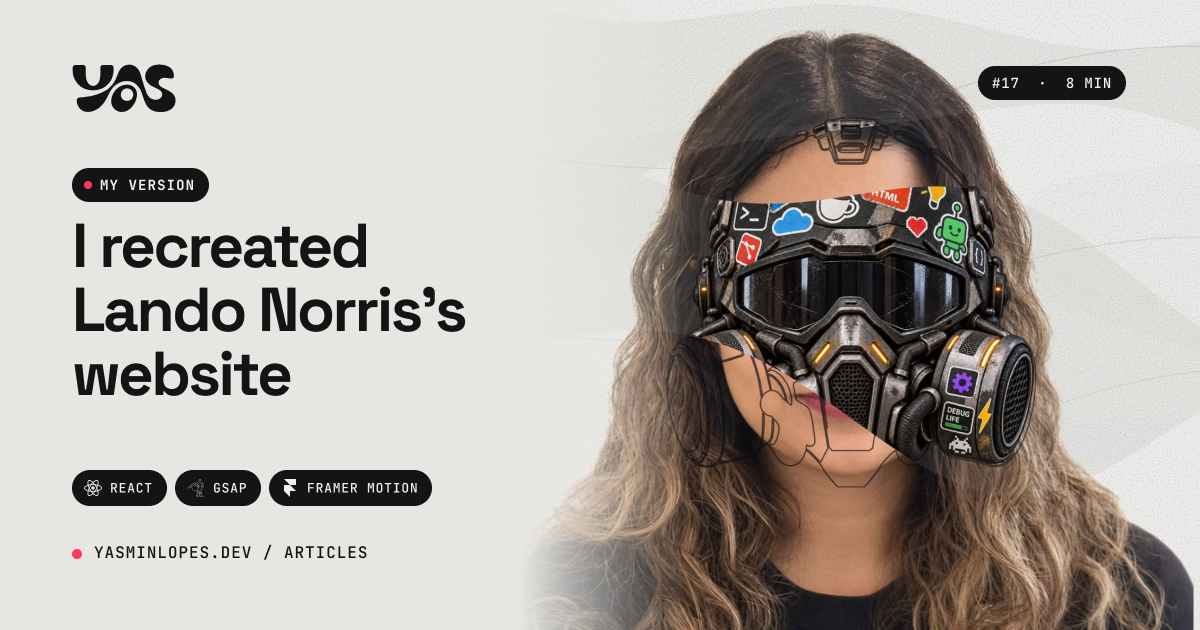
I was looking for a front-end challenge that would push me out of my comfort zone. Forms, dashboards and lists I can do in my sleep. I wanted real motion, the kind that makes people stop scrolling.
Then I remembered Lando Norris's website, the Formula 1 driver. If you've never opened it, go do it: the helmet appears over his face as you move the mouse, the page scrolls smoothly and everything reacts to the scroll. It's the kind of site that gets passed around as an agency reference, with cost estimates around US$ 50k.
I decided to recreate the technique in my portfolio. Not his site: the content, the photos and the drawing are mine. Instead of the helmet, a gas mask covered in dev stickers.
Want to see it in action? Open the live demo and move your mouse over the face (on mobile, tap "Touch to paint").
In this post I explain how the effect works under the hood: the layers, the decisions and the gotchas. The full step by step, with all the code, the images and the prompts, became an ebook. The link is at the end.
TL;DR#
- One rule rules them all: never animate the same property of the same element with two engines.
- Lenis handles the scroll, GSAP handles everything else, and both run on the same clock.
- The mask is not an opacity animation. It's an image clipped by brush strokes drawn in SVG every frame.
- Looking organic is cheap math: cosine to speed up and slow down, summed sines for the wobble, an exponential for smoothing.
- Everything stops when nobody is watching: off screen, hidden tab or
prefers-reduced-motion.
Anatomy of the effect#
The hero looks like a single thing, but it's layers stacked in the same spot:
- the background, with thin lines and blobs that slowly change shape;
- the portrait, a cut-out photo;
- the line drawing of the mask, which draws and erases itself in a loop, very thin;
- the actual mask, an image that only shows up where the brush has passed;
- grain on top of everything, which stitches the layers together and removes the "pasted PNG" look.
The trick is in the fourth layer. It doesn't appear with opacity, nor with a static mask-image. It's clipped by an SVG clipPath that I redraw every frame. Where there's a brush stroke, the mask shows; where the stroke has already passed, it disappears again.
Division of labor#
Before writing any animation, I decided who handles what:
| Library | Responsibility |
|---|---|
| Lenis | smooth scroll |
| GSAP + ScrollTrigger | everything that depends on scroll: pin, scrub, horizontal scroll, parallax |
| SplitText | splitting text into lines to reveal them one by one |
| Framer Motion | component lifecycle: opening the menu, button hover |
The rule: never animate the same property of the same element with two engines. If GSAP touches an element's transform, Framer Motion stays away from it. Two engines fighting over the same transform means guaranteed jitter, and it's the kind of bug that eats a whole afternoon.
A single clock#
Lenis makes the scroll smooth. ScrollTrigger reads the scroll position to animate things. If each one runs on its own requestAnimationFrame, they end up one frame out of sync, and the pinned element shakes.
The fix is to have one source of truth: Lenis starts without its own clock and gsap.ticker sets the pace.
<ReactLenis root ref={lenis} options={{ autoRaf: false }}>

// and inside the effect:
gsap.ticker.add((time) => lenis.raf(time * 1000));
There are three more details in this bridge (lag smoothing, syncing on the scroll event and recalculating everything after the fonts load) that make the difference between "almost smooth" and "smooth".
The brush#
Each brush stroke is a band that crosses the face from one side to the other, several of them in rotation: while one is being born, another is halfway and another is fading out. What makes it look like a brush, and not a CSS band, comes down to three ideas:
- Back and forth with cosine. The horizontal position follows
0.5 - cos(t * PI) * 0.5: it speeds up at the start and slows down at the end, like a real hand. - Summed sines. A slow wave gives the stroke its curve; a fast one gives the little wobble. Adding sine waves of different frequencies is the cheapest way to look organic without
Math.random()every frame, which would make everything jittery. - Variable pressure. The thickness changes along the band and tapers at both ends. That's what gives it the look of paint.
In the end, the list of points becomes a smooth curve using Catmull-Rom converted to Bézier. The same formula draws the background blobs.
Want to build exactly this brush? In the ebook Hero com Pincel the
brushPassPathappears in full, line by line, with every constant explained and what happens if you change it.
When the mouse comes in#
On hover, the brush gets thicker, reaches further, and the cursor itself leaves a trail that fades in 0.75 s. The switch between "idle" and "painting" is never a jump: each value chases its target.
const damp = (from: number, to: number, rate: number, dt: number) =>
  from + (to - from) * (1 - Math.exp(-rate * dt));
Why exponential, and not value += (target - value) * 0.1? Because the second one depends on the frame rate: on a 120 Hz monitor the animation runs twice as fast as on a 60 Hz one. With the frame time inside the exponential, the smoothing is the same on any screen.
From hero to card#
When you scroll, the whole hero shrinks and becomes a card in the middle of the screen, with my stack passing in bands behind it. It's a ScrollTrigger with scrub that animates the clip area, the corner radius, the colors and even the navigation theme at the same time.
And the whole look (colors, mask, background) changes by swapping one line: each scene is a set of tokens that becomes CSS variables, and each mask is an entry with the image, the drawing and how it fits on the face.
Things to watch out for#
Beautiful motion that freezes someone's phone is bad motion. Here's what I did to avoid that:
prefers-reduced-motioneverywhere. Anyone who asks for less motion sees a still hero and all the content.- It stops when nobody is watching. The engine pauses when the hero leaves the screen and when the tab goes to the background.
- No React in the animation loop. The brush strokes are updated straight in the DOM, 60 times per second, without re-rendering a single component.
- Touch is not a mouse. On mobile, dragging your finger needs to scroll the page. That's why there's a "Touch to paint" button: when it's on, the hero captures your finger and the scroll waits; when it's off, your finger scrolls normally.
What I learned#
Good motion is an architecture decision, not an animation one. The one-engine-per-property rule and the single clock fixed more bugs than any curve tweak.
Sine waves are the best friend of anything organic. Brush, blob, ripple: almost everything that looks alive here is a sum of sines.
You can copy the technique, not the identity. I didn't want a clone of Lando's site. I wanted to understand how it was made and tell my own story with it.
The full step by step#
This post is the map. The whole path is in the ebook Hero com Pincel: o efeito de revelar com React, GSAP e SVG, with 69 pages. The ebook is in Portuguese. At launch it costs R$ 39,90; after that it goes up to R$ 59,90.
What's inside:
- the project structure, folder by folder, and why each thing lives where it does;
- the complete code of the effect, the same one running on my portfolio, explained file by file;
- the brush math line by line, with what each constant does;
- the images: how to prepare the portrait, the mask and the line drawing, plus a prompt guide to generate your own mask with AI;
- fitting the mask to the face, on desktop and mobile;
- performance, accessibility and the touch-to-paint button;
- bonus: a ready-made prompt to ask an AI to build the effect in your project.
References#
Read next

Front-end16 min read
Multilingual SEO in React: hreflang, prerendering, sitemap

Front-end15 min read
How I make AI videos with Remotion: a real case study
Front-end15 min read
How to share passwords securely: inside Yush